List triggers: rules that qualify, enrich and hand off leads, with a cost ceiling per record
A list that sorts its own inbound leads, spends credits only where a rule says so and passes the ready ones on. What a trigger is, how to build one in five steps, what it costs and what it leaves to you.
New rows from a website form or webhook still need decisions: which fit the target group, which need an email, which can go to HubSpot and which should stay out. Repeating those checks by hand slows the hand-off. A list trigger makes the decisions you can express as rules.
What a trigger is
A trigger in ListPlus belongs to one list and reads as a sentence: when a record meets these conditions, do this. Conditions can use any column of the list, an evaluation verdict (ready, enrichable or unusable for a goal such as cold email), the record's status, its email verification result, whether it already sits in a pipeline, or whether it is in a reference list such as existing customers, grouped with AND and OR.
Ready in the Cold Email evaluation means the required fields pass the data-quality checks. A trigger can route that record; it does not check whether advertising email is permitted.
You choose when the rule looks: at new records, at changed ones, at both (so a record that becomes a match later is caught too), or at a deleted one. Then come up to five actions: hand over to a pipeline, set a status, mark as ignored, set a tag, and Enrich, which fills the record's own missing fields within a budget you set. Hand-overs and Enrich run first, then the rest in your order. A rule never acts twice on the same record, so a later edit produces no second hand-over.
Who it is for
Triggers are useful when new records arrive regularly and the same checks decide what happens next. They can keep unsuitable records out of a pipeline and enrich only those that meet your criteria. For a list reviewed only occasionally, manual work may be simpler.
Five steps
- Filter the list the way the rule should see it: a column filter, a status, a sublist or a check in Analyze such as “empty job title”.
- Click Triggers in the list header (the lightning icon), then Use current filter. What narrows the list becomes the conditions; what cannot, a quick search for example, is listed under “Not taken over”. Owners and admins set up triggers.
- Pick when the rule runs and add actions under Then. For Enrich, choose up to eight fields to reach, say work email and job title.
- Set “At most per record”: 5, 10, 25 or 50 credits, 10 by default. A step that would push a record past that budget is not started for it. The default fills empty cells only.
- Save; nothing runs before. With “a record is new or was changed” you can tick “Include records that already match” to run the rule once on the rows already there.
From then on the rule runs by itself: records from a form, a webhook, the API or an enrichment are checked within seconds, rows you edit yourself about 30 seconds after your first edit, so you can finish typing first.
The six templates
A list without triggers offers six starting points under Choose a template; nothing runs until you save. Spot decision makers gives C-level, founder and VP contacts the status “Qualified”. Find work emails looks up the business email where one can be found, charged only when found. Forward leads sends decision makers with a business email, marked Ready by the Cold Email data-quality check to a pipeline you choose. Clean up your list tags freemail, disposable and info@ addresses “Freemail” and marks them ignored. Enrich, then pass on is two linked rules: find the email of new decision makers, then forward them. Notify your team posts new decision makers with a business email to your Slack pipeline.
What it costs
The rule itself costs nothing, on every plan. The Enrich action runs the same lookups as the Enrich menu at the same prices: a company lookup by domain 0.25 credits, a verified work email 2, a deliverability check 0.3, a LinkedIn profile 0.5, each charged only when something is found. ListPlus picks the cheapest route from what the record holds and stops at your ceiling. At the default of 10 credits a record, one lead costs a rule at most $0.35 on Pro and $0.60 on Basic. A lead that is not your ICP never reaches the Enrich step and costs nothing.
A hand-over is priced per record delivered: 2 credits for HubSpot, Salesforce or Attio, 4 for Pipedrive, 2 for Google Sheets, 1 for Slack, Lemlist or Instantly, 0.25 for your own webhook, nothing for team email or another list; a record the target turns down is not charged. Connected targets such as HubSpot, Slack, Salesforce, Pipedrive or Attio and reference-list conditions need Pro.
What it does not do
A trigger reacts to a record being written, not to the clock: “older than 30 days” is checked when the record changes, not by itself once the days have passed. Triggers send no email; an Email draft pipeline puts a draft into your own Gmail or Outlook, and you send it. There is no dry run for a rule's enrichment: the preview shows how many records match before you save, so narrow the conditions and start with a low budget. Limits: 20 triggers per list, 5 actions each, 5 OR groups of 12 conditions.
Where you see it working
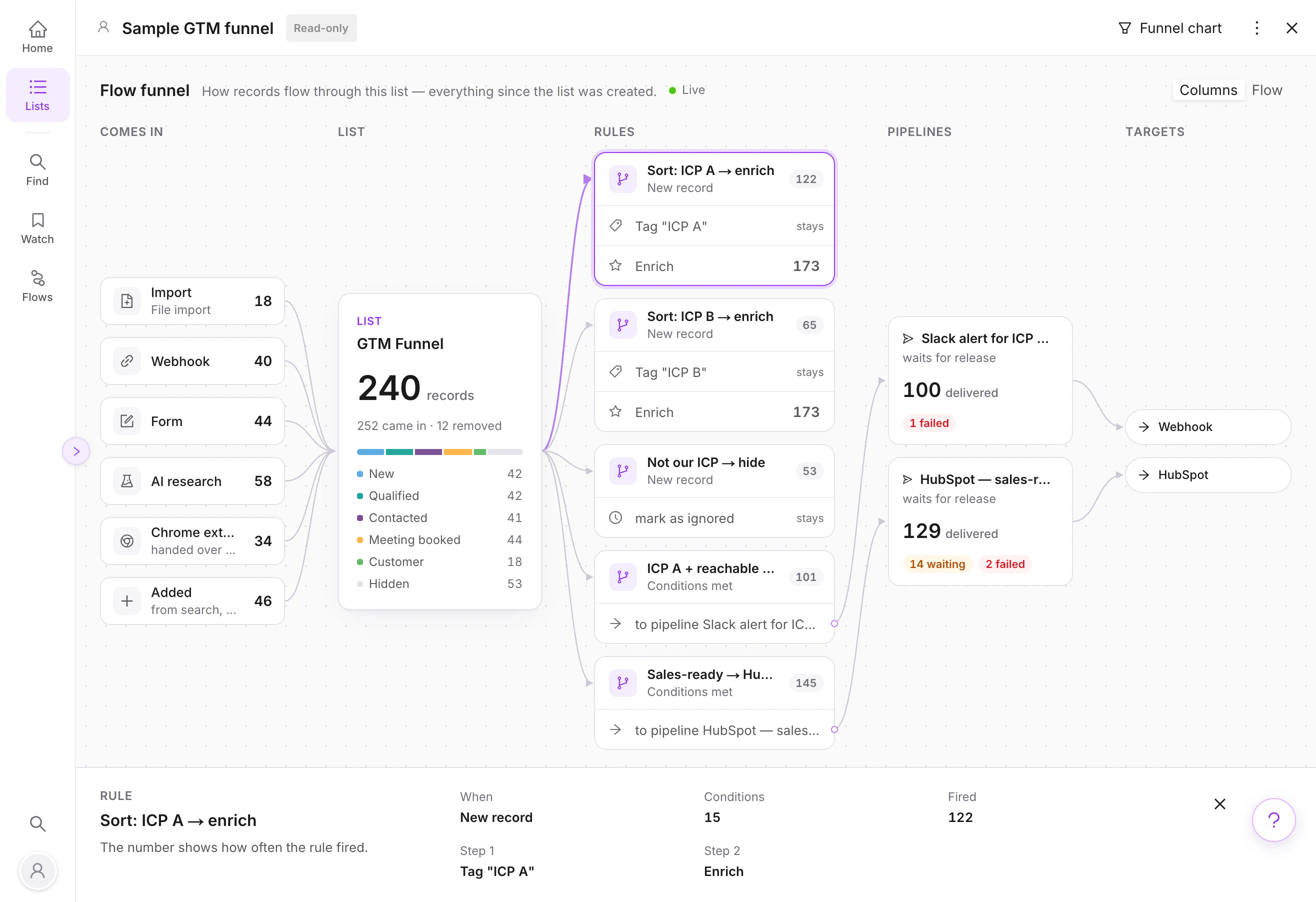
A record a rule is enriching carries a moving ring on its row until the cells fill in. What could not be done, a lookup with no credits left or a pipeline that is full, shows under Flows, To do, with the reason and a Try again. The list's Flow funnel counts how often each rule fired, and a rule's card names the problem when its last run could not act.