ListPlus AI agents

AI agents

Give your agentthe tools your team uses.

Research sources, enrichment, quality checks and your lists, exposed to your AI through one connection you control. Your agent plans the work. ListPlus supplies the contact data tools and a place to deliver.

A task for your agentExample instruction
Find contacts with missing job titles. Enrich those titles without overwriting existing values, then run the check again.
InspectEnrichRecheck

Example instruction · Set access and update rules in the connection.

The platform behind the workflow

Research, enrichment and checks. Connected to your lists.

Your agent plans the research. ListPlus supplies the contact-data tools and the lists it works with: research sources, enrichment, quality checks and connections to the next step.

Your AI agent

Understands the task and chooses the next action

MCP / REST

ListPlus connection

  • Selected data
  • Available tools
  • Permitted updates

Your lists & workflows

  • Research & lookup
  • 100+ quality checks
  • Enrichment & verification
  • Lists & connected workflows
Connection concept · Data and tools depend on the access you configure.

Discover what’s available

One GET on the connection returns columns, types, allowed actions, filter conditions and limits. The agent works with the real structure, no documentation needed.

Target the records that matter

Checks return the affected record IDs. Your agent uses them to request a specific fix or enrichment instead of touching the whole list.

Deliver into a defined workflow

Choose the destination list, its requirements and the next action. Agents work toward the same handoff instead of producing a separate report.

What the connection offers

Real actions. Real tools. Real limits.

Everything below is what the endpoint exposes today. REST at listplus.ai/d/{token}, the same connection as an MCP server at listplus.ai/mcp/{token}.

Read

  • query
  • count
  • find
  • column_summary
  • credit_balance

Write

  • add_records · up to 1,000 per call
  • update · dry_run, only_empty
  • set_tags
  • set_sublists
  • ignore / restore
  • create_columns

Quality

  • run_checks · score 0–10, free
  • fix_check
  • clean_values · free
  • dedup_merge
  • derive · AI column filling

Enrich

  • enrich · company, contact, person lookup
  • only when data is found

Research tools

  • google_search · web, news, places, scholarfree
  • website_scrape · any public page to Markdownfree
  • hackernews_searchfree
  • company_lookup · domain to company profile0.25 cr
  • crunchbase · funding rounds1 cr
  • twitter_search · per 100 tweets3 cr
  • reddit_search6 cr

34 filter conditions, for example

c_level_executivedecision_makercorporate_emaildisposable_emailemail_typofuzzy_matchneeds_company_standardizationphone_with_country_code

Permission presets

Read onlyData assistantEnrichmentData collectorFull accessCustom

1 credit is €0.03. Enrichment is billed only when data is found; research tools per call. Every call is logged with action, rows, credits and duration.

Full API reference
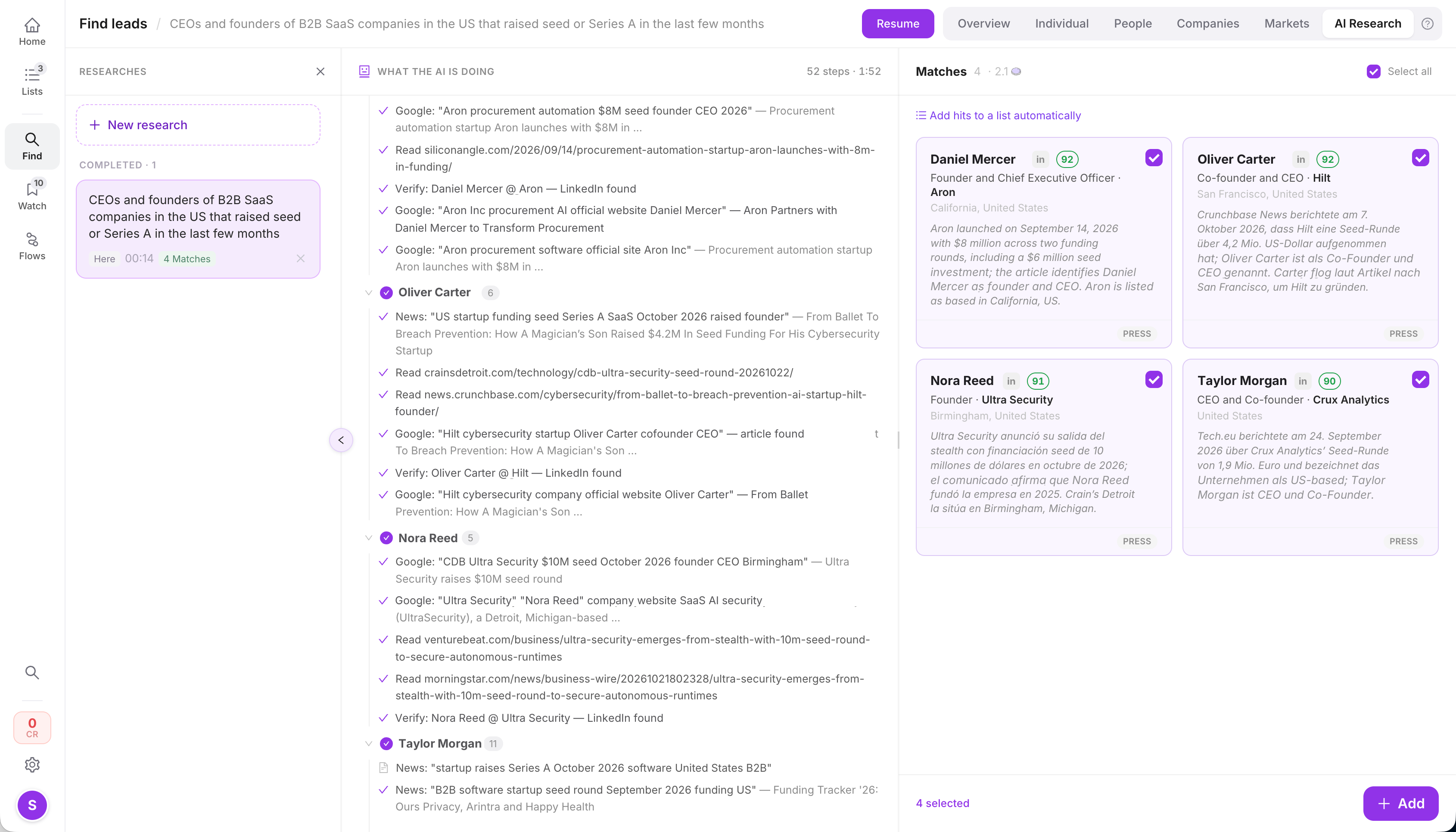
01 · Find new leads

One brief. Several research paths.

Start with the audience you have in mind. Your agent chooses relevant sources, investigates companies and people, and uses ListPlus to enrich and check the candidates.

Example research brief
“Find the founders of German fintech startups that announced their first funding round in the last three months.”
  1. Turn the brief into criteria

    Sector, country, round type and time window. The agent knows what counts as a match before it starts searching.

  2. Research companies and people

    Find candidates and compare their roles, location and company details with your criteria. Keep the supporting context.

  3. Prepare the qualified contacts

    Enrich the fields your target list needs and run the relevant checks before the handoff.

Explore audience research
Parallel research · Workflow illustration
Your research brief
Research agents
Google NewsFunding announcements
CrunchbaseRound, date, investors
Company lookupSize, industry, domain
LinkedInFounders & roles
ListPlusIdentify people · Enrich details · Verify emails
Candidates ready for your qualification rules
Illustrative research paths. Agents choose relevant sources according to their tools and access.
The same brief, step by stepSeed-stage founders → contacts ready for outreach

Five calls, each one an existing action of the connection. Free steps first, paid enrichment only for the candidates that qualify.

  1. Find the signal

    Search news for seed and Series A announcements in the sector and time window.

    google_search · news · free
  2. Confirm the company

    Domain, industry and size; round, date and investors. Companies outside the sector or past their first round drop out.

    company_lookup 0.25 cr · crunchbase 1 cr
  3. Find the founder

    Search for founder or CEO plus company name to get the LinkedIn profile.

    linkedin_search · free
  4. Enrich the contact

    Business email and phone, charged only when found.

    enrich · 2–6 cr on a hit
  5. Check and deliver

    Run the list’s checks, then move the contacts that pass into the outreach sublist.

    run_checks · set_sublists

A funding announcement is a research signal, not proof of buying intent. Your qualification rules decide.

Define the criteria and the destination before research begins: roles, company criteria, required fields and handoff rules.

02 · Qualify & deliver

Make quality part of the handoff.

Define what belongs in your target list. Use the same checks and enrichment tools your team uses to qualify research results before they enter the next workflow.

Set the entry requirements

Choose the criteria, essential contact fields and checks that a candidate must pass.

Resolve what can be improved

Clean inconsistent values and enrich useful candidates with missing details. Keep unresolved records in the working set.

Hand off the contacts that qualify

Move passing contacts into the intended list or segment. Connect that destination to the next CRM or sequencer step.

Explore checks & enrichment
100+automated checks
Contact targeting
ListPlus checks for missing job titles, role-based email addresses, personal email domains and company names in job titles, each with a count.
Actual product · Checks available to people and agentsView larger
CheckEnrichCheck again
A defined handoff · Workflow concept
Research candidates
Your quality rules
Qualified target list
CRM / sequencer
Not passed: enrich or review
Configure the gate and destination for the workflow. Records that do not qualify stay out of the downstream handoff.
Your data, your rules

Give each task the access it needs.

Set the working boundaries in the connection: which data is visible, which tools are available and which updates are permitted. The prompt describes the task; these settings define its access.

A focused example

Normalize country names.

For this task, expose country values and record IDs. Restrict writes to the country field and use the returned mapping to update the matching records.

USUSAUnited StatesUnited States
Example working scope
Country values + record IDs
Permitted change
Country field only

Field-scope illustration. Other tasks may need names, emails or other contact details.

Visible data
Choose the list or sublists and hide columns that the task does not need.
Available tools
Allow the relevant checks, research actions and enrichment types.
Permitted updates
Restrict writable columns. Enable fill-only-empty updates when existing values should be kept.
Operating limits
Requests per minute, row caps, enrichment batch size and an expiry date for the connection.
Explore Data Gate & field permissions
From idea to first task

Connect your agent. Start with one useful job.

  1. Define the destination and rules

    Choose the target list, criteria and required fields. Create the agent connection with the data, tools and updates this workflow needs.

  2. Add the connection to your agent

    Paste the MCP URL into a compatible client, or use the REST endpoint in your agent or workflow. ListPlus generates a ready-to-paste instruction block.

  3. Run a focused task and review it

    Start with a check or a small set of records. Inspect the result and the execution log in ListPlus before expanding the work.

ListPlus agent connection permissions: presets Read Only, Data Assistant, Enrichment, Data Collector, Full Access and Custom, plus sections for actions, enrichment, visible columns, write protection and limits.
Actual product · Connection permissionsView larger
ListPlus execution log of an agent connection: query, add and Hacker News search calls with row counts and durations.
Actual product · Execution logView larger

MCP

For compatible AI clients

Every connection is an MCP server. Claude, ChatGPT or any MCP client discovers the permitted ListPlus actions as tools and calls them.

REST

For agents, scripts & workflows

One GET returns the schema and available actions. Then POST actions to the connection endpoint. Anything that speaks HTTP works.

Agent API access is included in Premium.

ListPlus research, enrichment and verification follow their credit rules. Your external agent or hosting provider may charge separately.

Plans & usage
A few practical details

Before you connect.

Which AI agents can I connect?

Any MCP client, such as Claude or ChatGPT, or any agent that can make HTTP requests. The connection determines which lists, data and actions are available. If you prefer to work in the app, ListPlus has built-in audience research.

Can an agent work without reading every contact field?

Yes. Hide columns and narrow the records available to the connection. Checks return record IDs, so operations target only the relevant records. Configure that scope explicitly; a prompt alone does not create it.

Can I keep existing values when enriching?

Yes. Restrict writable columns and enable fill-only-empty updates. The update action also has a dry-run mode to preview changes first.

Does ListPlus keep my external agent running?

No. Your agent’s runtime and hosting determine when it runs. The ListPlus connection provides data and tools; it does not host the agent or schedule its work.

Does a found contact automatically count as verified?

No. A found value, an email-verification result and a record meeting your list’s requirements are different things. Have the agent request the relevant checks and review unresolved results before using the contacts.

What does agent usage cost?

Reading, checks and cleaning are free. Enrichment costs credits only when data is found, 2 to 6 credits per person. Research tools are billed per call: Google, Hacker News and website reading are free, company lookup 0.25, Crunchbase 1, X 3, Reddit 6 credits. 1 credit is €0.03.

Your agent’s next task

Send your agents out.Give them a place to deliver.

Contact research, enrichment and the workflows that follow, on your lists, under your rules.