For contact lists and CRM data
Check your contact data.Find errors with 100+ checks.
Find duplicates, invalid emails and inconsistent values in your contact lists. Select the affected records and correct them in the same list.
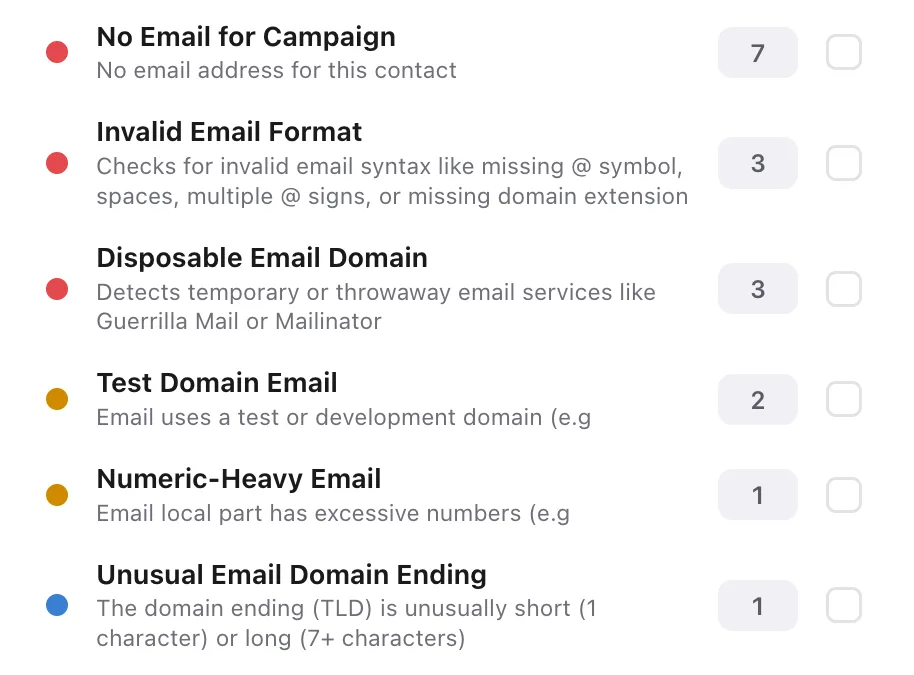
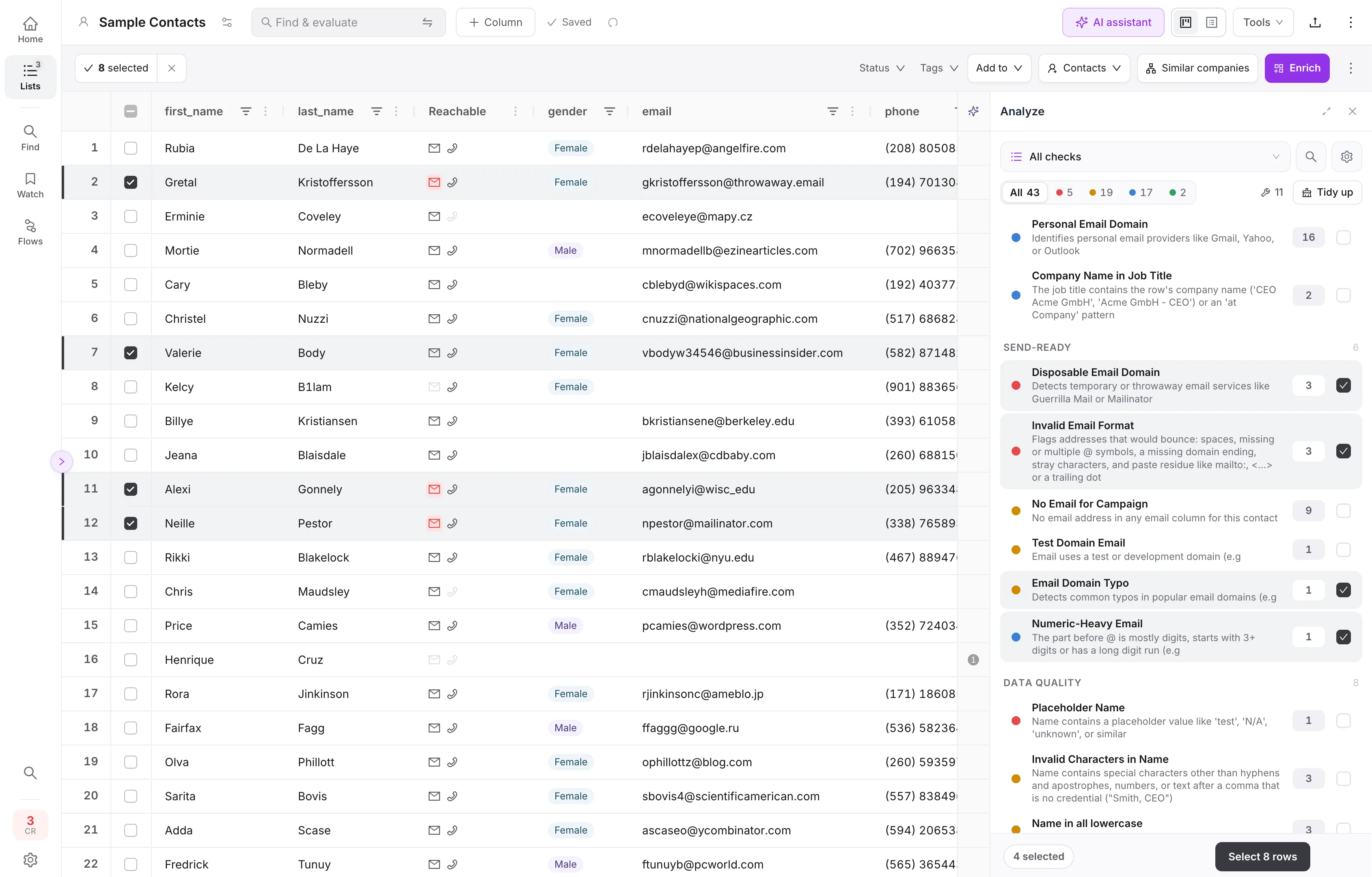
Check contact data quality with 100+ automated checks
100+ automated checks help you spot missing information, formatting problems and mismatches. Select a check to work on the affected records.
Click a number in the image to learn more.Tap a number. Swipe sideways to see more areas.
One row, eight findings.
A record as it comes out of a CRM export, and what the checks find in it.
- 1Name in ALL CAPSName
- 2Emoji in NameName
- 3Email Domain TypoEmail · gmial.con
- 4Email-Company MismatchEmail
- 5Duplicate EmailEmail · also in row 212
- 6Company Name in Job TitleJob title
- 7Company in all lowercaseCompany
- 8Missing Country CodePhone
- Name
- MIKE JOHNSON 🚀
- Name in ALL CAPS
- Emoji in Name
- mike.johnson@gmial.con
- Email Domain Typo · gmial.con
- Email-Company Mismatch
- Duplicate Email · also in row 212
- Job title
- Head of Sales @ Acme Inc
- Company Name in Job Title
- Company
- acme inc
- Company in all lowercase
- Phone
- (415) 555-0134
- Missing Country Code
100+ checks, by area
Click an area to see its checks- Invalid Email Format
- Disposable Email Domain
- Role-Based Email
- Personal Email Domain
- Email Domain Typo
- Consecutive Dots in Email
- Random Email Local Part
- Plus Addressing
- Numeric-Heavy Email
- Test Domain Email
- Tenant Default Domain
Names
31- Invalid Characters in Name
- Name in ALL CAPS
- Partial ALL CAPS in Name
- Name in all lowercase
- Unusual Capitalization
- Missing Name
- Single Character Name
- Name Too Long
- Full Name in Field
- Placeholder Name
- Fake/Test Name (AI)
- Second Given Name in Last Name (AI)
- Not a Person (AI)
- Email in Name Field
- Identical First and Last Name
- Encoding Issues
- Title Prefix in Name
- Suffix in Last Name
- Emoji in Name
- Invisible Characters in Name
- Extra Spaces in Name
- Credential Suffix in Name
- Connection Degree in Name
- LinkedIn Status Text in Name
- Middle Initial in Name
- Title Instead of First Name
- Remark in Name
- E-mail Local Part as First Name
- Name Cut to Initial
- Language Inconsistency
- Salutation Inconsistency
Job titles
16- Empty Job Title
- Placeholder Job Title
- Job Title in ALL CAPS
- Job Title in all lowercase
- Suspicious Characters in Job Title
- Job Title Too Long
- Tagline in Job Title
- Department Name Instead of Job Title (AI)
- Former/Ex Role
- Company Name in Job Title
- Emoji in Job Title
- Invisible Characters in Job Title
- LinkedIn Status Text in Job Title
- Seniority Classification (AI)
- Seniority Inconsistency
- Job Function Inconsistency
Company
15- Empty Company
- Placeholder Company
- Company in ALL CAPS
- Company in all lowercase
- Encoding Issues
- URL as Company Name
- Legal Suffix Normalization
- LinkedIn Status Text
- Tagline in Company Name
- Emoji in Company Name
- Invisible Characters
- Person Name as Company (AI)
- Company Data Available
- Industry Inconsistency
- Department Inconsistency
Address & country
14- Invalid Country Format
- Misspelled Country Name (AI)
- Country Name → ISO Code (AI)
- Invalid ZIP/Postal Code Format
- Empty Country Field
- Empty City Field
- City in ALL CAPS
- City in all lowercase
- Placeholder City
- Unusual City Capitalization
- Country in ALL CAPS
- Country in all lowercase
- Country Format Inconsistency
- State Inconsistency
Phone
07- Placeholder Phone
- Missing Country Code
- Phone Too Short
- Phone Too Long
- Letters in Phone
- Fake Phone Pattern
- Phone Has Extension
- Invalid LinkedIn URL Format
- LinkedIn Company Page
- URL Not LinkedIn
- Truncated LinkedIn URL
- LinkedIn Placeholder Value
Duplicates
08- Duplicate Email
- Shared Email
- Duplicate Name + Company
- Duplicate LinkedIn
- Duplicate Phone
- Shared Phone
- Similar Name + Company
- Sparse Name Duplicate
Consistency & completeness
10- Gender Normalization
- Mixed Types in Column
- Date Format Inconsistency
- Empty Row
- Email-Company Mismatch
- Phone-Country Mismatch
- City-Country Mismatch (AI)
- Name-Email Mismatch
- Do-Not-Contact Email
- Enrichment Data Available
Campaign readiness
08- No Email for Campaign
- On the block list
- Existing customer
- Competitor
- Partner
- In a reference list
- Lead Source Inconsistency
- Lead Status Inconsistency
Useful segments
06Checks also find what you can use. A useful segment does not have to be an error:
- Corporate Emails
- Decision Makers
- C-Level Executives
- Sales Roles
- Technical Roles
- High-Quality Records
The checks shown depend on the list’s columns and data. Some AI checks require optional AI analysis.
Fix many issues in one click.
Many checks suggest a fix you can apply on its own or with others. You can also bring country values into a format you choose.
Explore data cleaningCorrections from the standard checks cost no credits; AI checks and AI fixes use a few.
Ask your list. Change it with an instruction.
The AI assistant is part of the working list. Ask about counts and patterns, select the records that matter, or describe a cleanup task in your own words.
Your entire list is never sent to the AI model.
Example: a large list, a small model request
To understand your request, the model receives your instruction, column structure and counts. For normalization, it receives only distinct values and their frequencies, without record IDs. ListPlus maps the suggestions back to records; you review the changes before applying them.
Model requests with personal data run in EU data centers by default. Only the workspace owner can enable global processing.
The gateway is configured to use only providers that do not train their models on these requests.
- How good are the email addresses in this list? Check formats, disposable domains, domain typos and info@ addresses.
I found 3 invalid formats, 3 disposable addresses and 1 possible domain typo. The 2 info@ addresses are role inboxes, not format errors. Should I select the 7 contacts that need review?
- Yes, select those 7 contacts.
7 contacts selected. The two info@ addresses remain unselected.
- Standardize address_country to English country names. Show me the mappings before applying them.
I found 19 distinct values and prepared the mappings, including US and USA → United States. Review them before confirming the changes.
Add the missing details after the check.
Use the selected records to find missing work emails and company details. See the search route and credit ceiling before you start.
What do the 100+ checks find?
They flag missing fields, invalid email formats, duplicates, inconsistent names and other issues. Some checks also identify useful segments, such as decision makers.
Can I work only on affected records?
Yes. Select a check to see its affected records. You can then correct, tag, ignore or pass them to a flow.
Does cleaning cost credits?
Standard checks and their cleaning actions do not use credits. Optional AI checks and AI fixes show their usage before you run them.
Can I add missing data after cleaning?
Yes. Select the records and enrich missing contact or company fields. The data enrichment page shows how this works.
Check your list.See what you can improve.
Explore the workflow with sample data, or bring your own contacts.