Collect contacts.Check and route them automatically.
Bring contacts from forms, webhooks, app events and AI research into one list. Check and enrich them according to your rules. Pipelines pass the results to other lists, your sequencer, your own workflow or your CRM.
- Hosted in the EU
- AI models run in the EU by default
- DPA included
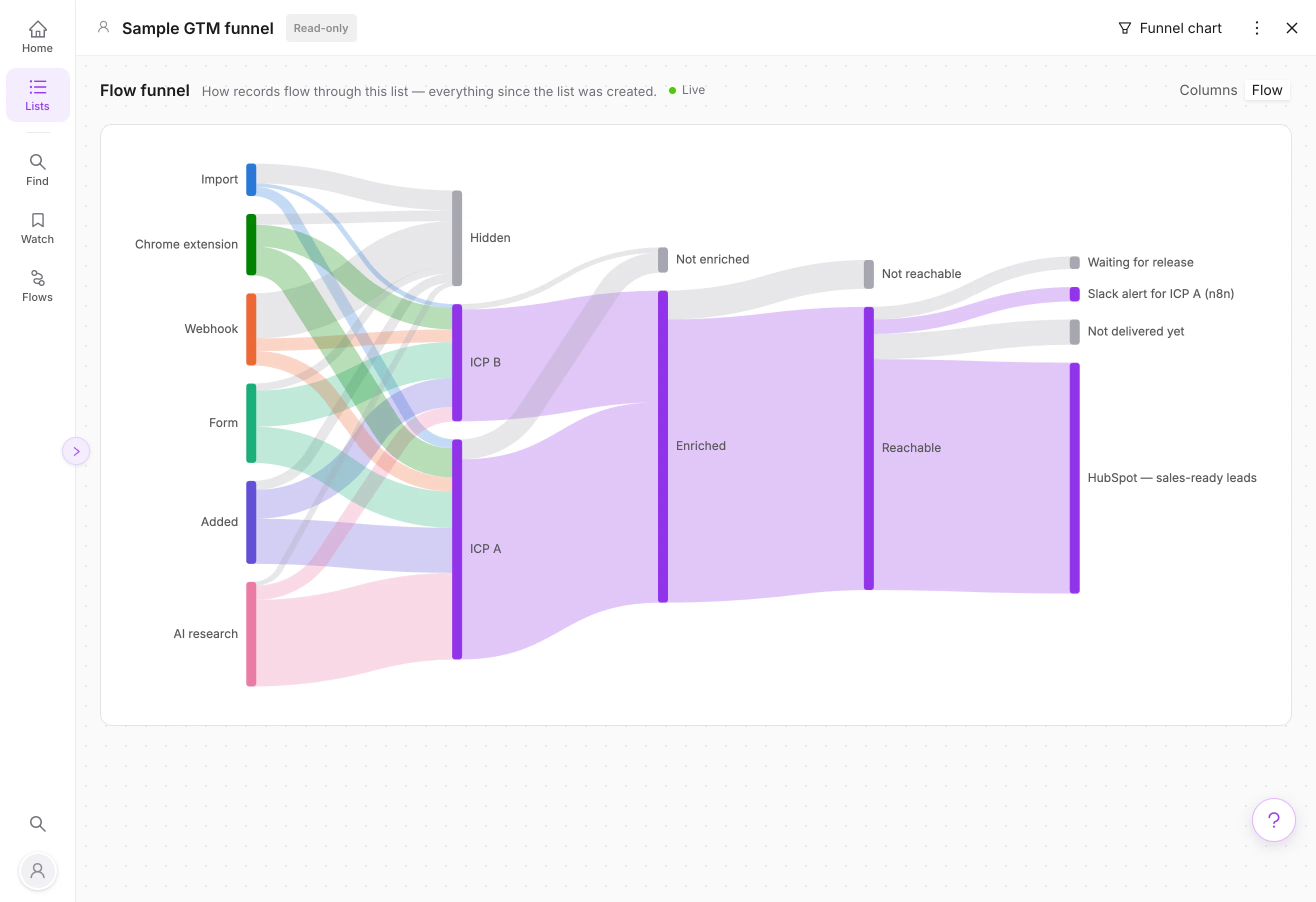
From the data source to your next step.
Improve existing CRM data or prepare new leads for outreach. These examples show how inputs, data checks, rules and pipelines work together.
 HubSpot
 Slack #crm-hygiene
The funnel: how many of the leads that came in made it to the target
- 1,840Came in from HubSpot
- 1,840In the list
- 1,743Reachable (valid e-mail)
- 1,714Complete after filling
- 1,702Written back
Each case as its own page:Clean up the CRMInbound processOutbound
Automate GTM workflows from incoming contact to handoff
Choose your data sources, define rules using data checks and other criteria, and set up the handoff. Pipelines send records automatically or when you approve them.
Many doors. One list.
- App eventsA new HubSpot contact, a Zoom webinar registration or a form submission: connected app events add contacts to your list automatically.
- Webhook and formn8n, Zapier, Make or your product post JSON; the list's own form takes entries from your site.
- Connected toolsHubSpot, Salesforce, Pipedrive, Attio, Sheets, Notion, Airtable — and 3,000+ apps.
- AI researchAgents research an audience you describe and hand over the matches with a fit score.
- Find and Markets300 million profiles to filter; a market counted before you load a company.
- Browser and inboxThe Chrome extension, forwarded e-mails, LinkedIn imports, a business card.
The list knows what belongs where. And what is wrong.
Every column has a content type, so the list knows what "Mail2" is. 100+ checks find duplicates, free-mail addresses, empty titles and values that do not fit — all the time, as leads arrive.
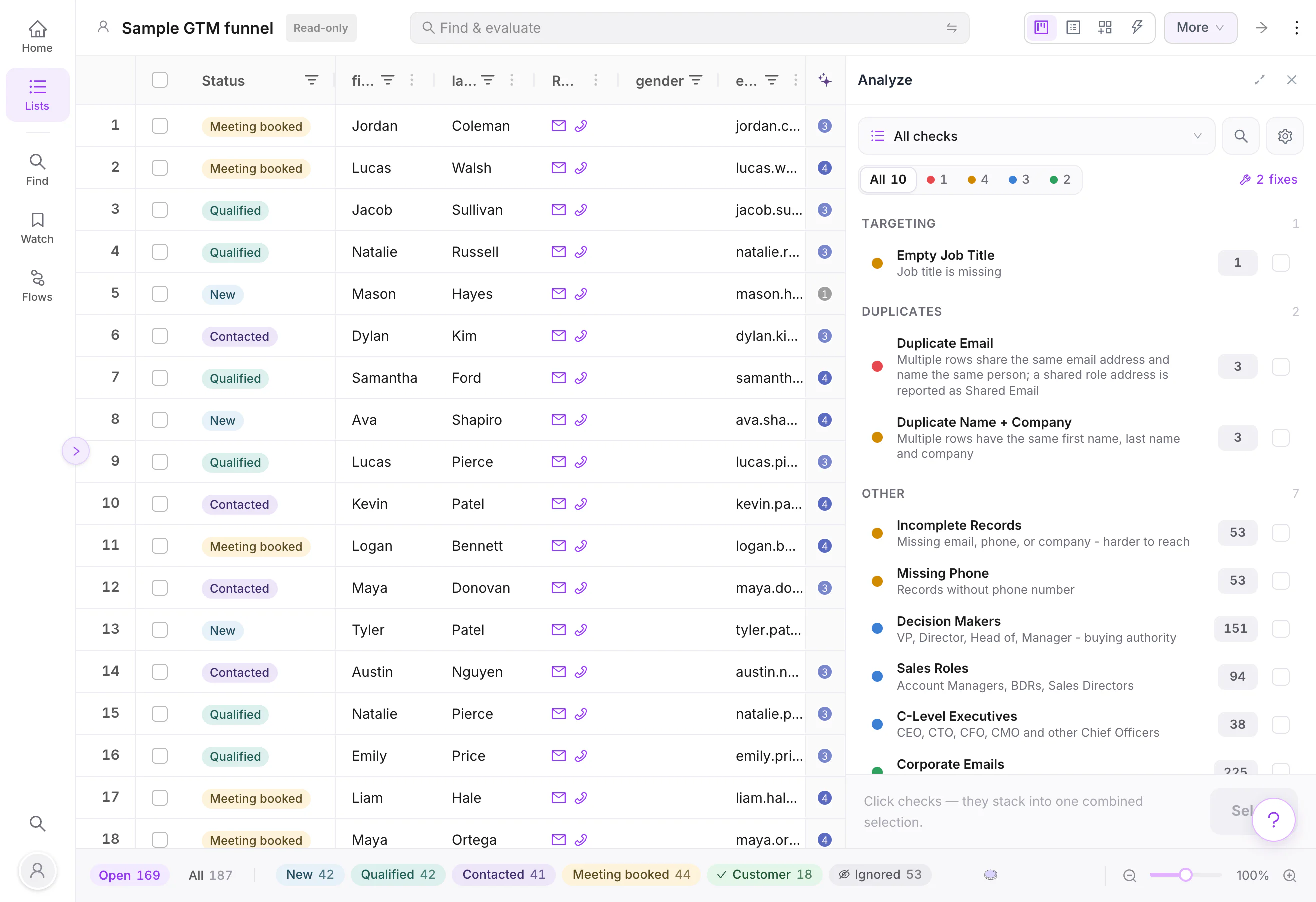
Columns that answer a question per row.
A score, a label, an AI sentence, a formula: each is a column the list computes itself and recomputes the moment an input changes. They read the 100+ checks too — "e-mail invalid" or "duplicate" becomes a value — and "is this contact in HubSpot?" is answered live. A trigger then reads these columns like any other.
- ScorePoints per criterion — decision maker +40, business e-mail +20, free-mail −10 — and a tier A, B or C. Every row shows why.
- LabelOne value per row by your rules: "in HubSpot?" (checked live), "customer on list X?", a segment.
- AI textA sentence the AI writes or judges per row — "the company sells software" — asked once per distinct value.
- FormulaCalculate and combine, like in a spreadsheet. No credits, always current.
| Job title | Score | Tier | |
|---|---|---|---|
| Managing Director | anna@acme.com | 60 | A |
| Sales Manager | tom@datadog.com | 20 | C |
| Intern | max@gmail.com | 0 | C |
Updates itself. Rule criteria and formulas cost nothing; an AI criterion is judged once per distinct value.
A big problem, solved in one row.
A trigger watches an event — a record is new, or changed — checks conditions on any column, and runs up to five actions in order. Because computed columns are columns too, one sentence can do what used to take three tools:
When a record is new or changed, and …
- is not in HubSpot
- Score > 80
- hand it to the pipeline "to HubSpot"
- set status "ready"
When a record changed, and …
- Tag ICP A
- e-mail verified
- not in a sequence yet
- hand it to the pipeline "lemlist"
- set tag "in sequence"
What it reacts to
- a record is new
- a record changed
- new or changed and meets the conditions
- a record was deleted
What it can check
- any column
- seniority, company size, country
- e-mail check: valid, catch-all, invalid
- status, tag, pipeline mark
- a score or label
- is on a reference list
- AND / OR groups
What it does, in order
- enrich — the waterfall, with a budget per record
- set a status
- set a tag
- mark as ignored
- hand to a pipeline
- Recognize decision makers
- Fill in e-mail
- Pass leads on
- Tidy the list
- Enrich, then pass on
- Notify the team
Examples only; your own takes a minute. Before you save, you see how many records match — 10 of 247 — and nothing runs until you switch it on.
When a lead is ready, a pipeline takes it on.
When a lead is ready, a trigger puts it into a pipeline, and the pipeline takes it to its target — when you click, or by itself. A lead that still misses a field the target needs waits until it is there. Nothing is lost, and nothing incomplete goes out.
HubSpot219 deliveredWhy does the pipeline check once more?
Two different questions. The trigger asks whether the lead fits — your conditions, the who. The pipeline asks whether the record has what the target needs — the required fields, the what. A lead that fits but misses a field is not sent and not lost: it waits as "To review" and goes by itself once the field is there. This second check is optional; without it the pipeline delivers whatever the trigger hands over.
By hand or by itself
Manual, when someone clicks Send, or automatic with a daily limit. A record missing a required field waits as "To review".
E-mail drafts, never sends
The e-mail draft target writes a personal first e-mail per lead into the drafts of your own Gmail or Outlook. You read it and press send. ListPlus sends nothing.
Back to the source, on your click
A list loaded from HubSpot, Salesforce, Attio, Sheets or Notion writes its fixes back when you click — only the fields you pulled, and where the source changed meanwhile, the source wins.
Where the ready ones go.
Send contacts to another list, a sequencer or your CRM. CRM targets can create new records or update existing ones. A webhook connects your own workflow in n8n, Zapier, Make or your API. Each target shows its price per record before you choose it.
- HubSpot
 Salesforce
 Pipedrive
 Attio
 lemlist (sequencer)
 Instantly (sequencer)
- Slack
 Google Sheets
 Webhook · n8n, Zapier, Make
- E-mail draft
- Another list
Connected tools need Pro; Basic may take one tool for credits. Webhook, another list and the team e-mail need no plan.
All integrationsBuilt for the people who answer for the data — and the credits.
A trigger you set up, or your click, releases every delivery. Every record shows where it came from and where it went. Data and AI stay in the EU.
Release you control
Manual by default. Automatic with a daily cap; a pipeline pauses itself after repeated failures.
A ceiling, not an estimate
An enrichment never spends past the maximum you accepted. A lookup that finds nothing costs nothing.
Hosted in Frankfurt
App and working data on Vercel and Redis in the EU region. The DPA is part of the user agreement on every plan. Operator: salesperformer GmbH, Germany.
AI in the EU, no training
Every model call with personal data runs in EU data centers by default, without retention at the model provider and without training. A workspace owner can switch to models outside the EU.
- writes to your CRM without a trigger you set up or your click
- sends an e-mail to a lead
- spends past the ceiling you accepted
- trains a model on your data
- keeps a contact database of its own
- CRM (HubSpot, Salesforce, Attio)
- 2 credits
- Pipedrive
- 4 credits
- Sequencer (lemlist, Instantly), Slack, e-mail draft
- 1 credit
- Google Sheets
- 2 credits
- Webhook
- 0.25 credits
- Another list, team e-mail
- nothing
Triggers, scores, checks, forms, webhooks and lists cost nothing. Enrichment is priced per hit. A failed delivery is not charged.
What exactly is a flow in ListPlus?
Not a separate product. Every list is a flow: the ways records come in, the triggers that qualify and enrich them, the pipelines that take them elsewhere. "Flows" in the left bar shows all of them on one page, and each list has its own Flow funnel with the numbers.
Do I have to build a workflow first?
No. A list works without any trigger. Add one when you notice you are doing the same thing by hand: tag the right ones, hide the wrong ones, enrich the ones worth it, hand the ready ones on. Templates give you the common ones in a click.
Does enrichment run on every lead?
Only where a trigger says so. That is the point of qualifying first: a lead that is not your ICP never costs a credit. Enrichment is priced per hit; a lookup that finds nothing is not charged.
Does ListPlus send e-mails to my leads?
No. The e-mail draft target puts drafts into your own Gmail or Outlook; you read and send them yourself. Pipelines to Slack, your CRM or a webhook deliver records, not mail.
What does a flow cost?
Triggers, scores, checks, forms, webhooks and lists cost nothing. Enrichment is priced per hit, deliveries per record (the table above), app events 1 credit per event. Connected tools need Pro; Basic may take one tool for credits.
Do I still need Clay?
If you need a visual workflow builder with hundreds of columns, keep it. If you need leads in a list, checked, scored, enriched where it pays and in your CRM or sequencer by a trigger, this is the shorter way. There is no builder to learn, and the price per record is shown before you pick the target.
Set it up once. Every lead passes through by itself.
Open the sample flow to see a real list with its ways in, triggers and pipelines. Or start with your own.