AI Research: find people and companies by what they did, not what they are
A database filter can narrow by job title, company size and location. AI Research also looks for events and statements that do not exist as database columns.
Every outbound list starts with a filter: title, headcount, industry, country. A filter describes what a person is. The reason you want to talk to them is usually something they did: posted a first job for a security engineer, announced a seed round, complained on Reddit about an enrichment bill. None of that is a column in a database.
What AI Research is
ListPlus has a second search mode next to the database filters, called AI Research. You describe the audience in one sentence. An agent on the server works through the sources you allowed: web search, job postings, news, Hacker News, LinkedIn posts, Reddit, X and the audience database. For every candidate it reads the page, decides whether the brief fits, looks up the real LinkedIn profile, and records the match with a fit score from 0 to 100, a one-line reason and the evidence.
The example brief the app offers reads: “CEOs and founders of B2B SaaS companies in the US that raised seed or Series A in the last few months.” It has the three parts a good brief needs: a role, a visible signal, an industry or region. Leave the signal out and you have written a database filter in prose.
Who it is for
Use AI Research when an observable event matters more than a job title or company-size filter: a newly posted role, a technology change or an event appearance. If role, company size and country describe your audience well enough, the People and Companies search is faster and cheaper per record.
How a run works, in five steps
- Describe the leads. Open Find, switch to AI Research, type or dictate the brief. “Insert example” drops the funding example in; the cards under “More research ideas” load a brief and switch on the sources it needs.
- Set the stop target and the budget. “Stop after” takes 25, 50, 100 or no limit. “Credit limit” is a fixed list from 10 to 500 credits, 50 by default. The run ends at whichever comes first, or when a round finds nothing new; if it would stop early, ListPlus starts another round, up to five, never past the limit.
- Allow sources. Each source is a switch under “Allowed AI tools” with its price beside it. A switch is a permission, not an order: the agent calls job postings only when the brief asks who is hiring. A ticked source the brief never needs costs nothing.
- Start and walk away. The run works on the server; the tab can close. A live counter shows credits used, “Stop” keeps what was found, “Resume” opens another pass of the same size.
- Hand matches to a list. Tick them and click “Add to list” (free into an existing list), or answer “Automatically add new matches to a list?” with yes and set the bar: fit 50+, 70+ or 85+. Duplicates stay out; with a target list, “Stop after” counts the records that actually landed.
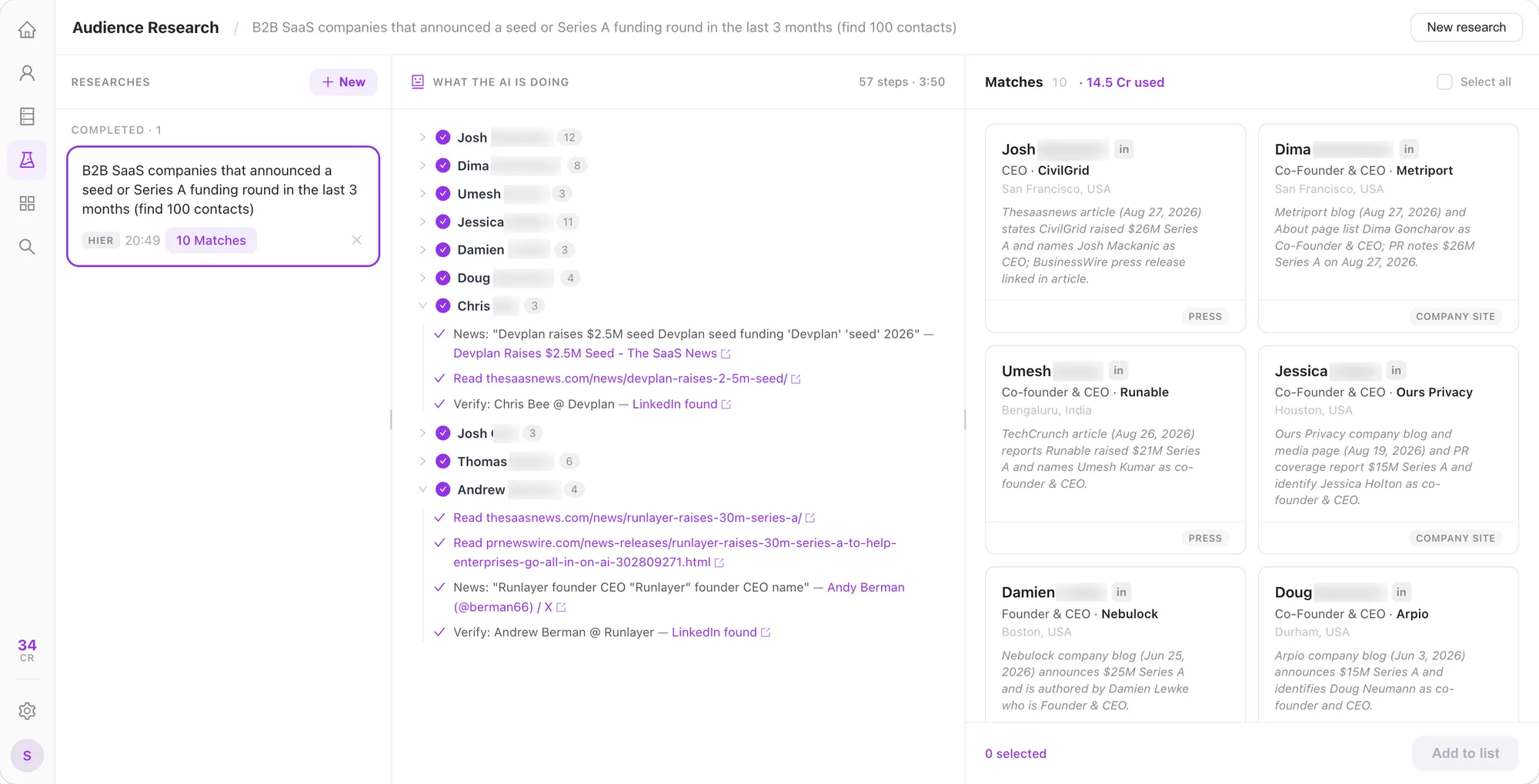
What comes back
The demo screenshot shows where each match's company, location, source and date appear. Open a match to see the steps that led there, down to the LinkedIn profile that was verified. Find LinkedIn is free and runs before a match is recorded, so a person without a real profile does not become a match. Read the evidence yourself before contacting anyone. AI Research returns a person with evidence, not yet an email; email enrichment happens later in the list and is charged on a hit.
What it costs
There is no price per match and no price per run. The agent's reasoning is billed by usage like any AI step in ListPlus; the paid sources are billed per call: Database 2 credits per page of up to 25 results (an empty or repeated page is free), LinkedIn people 4 per search plus 0.5 per profile found, LinkedIn posts 0.5 per search plus 0.75 per post whose reactions are read, Reddit 10 per 25 posts or comments, X 3 per 100 posts. Web search, reading pages, job postings, news, Hacker News and Find LinkedIn cost nothing.
The credit limit covers the agent and the paid sources. The default limit is 50 credits; on Pro that is a ceiling of $1.75 at the published rate of $0.035 per credit, not an expected price per match. The actual spend depends on which sources the agent calls.
Your AI: the same cockpit, your own assistant
If you already work in Claude or ChatGPT, hand the research to it. Pick “Your AI” under “Who should search?”, click “Generate URL” and paste the link, the MCP URL or the ready-made instruction into your assistant. It reports matches into the same research. Reported matches are free; the paid tools you switch on count against a cap of 10, 25 or 50 credits. The link works for anyone who holds it, so treat it like a password.
What it does not do
- It does not run on a schedule. A research runs once; “Resume” is a click you make. Checking an account for a funding round every month is not what it is for.
- It does not replace the database. A run holds at most 200 matches, 1,000 with a target list.
- It does not keep results forever: 7 days, 30 with hand-off to a list. The list keeps the records.
- It does not deliver emails or phone numbers. Those come from enrichment in the list, charged only on a hit.