You set the rules.Your list does the work.
Bring your leads into one list. Use 100+ checks, enrich missing data and score each contact. Your rules decide who moves on to your CRM or other tools.
See how a list works| Contact | Employees | Fit score | Next step |
|---|---|---|---|
| Maya ChenNorthstar Labs | 250 | 85 | Ready for CRM |
| Leo MartinForma Studio | 80 | 45 | Below threshold |
| Nora WeberHelio Systems | 320 | 85 | Existing customer |
| Sam RiveraArbor Cloud | 160 | 85 | Needs a phone |
Your columns answer the questions. Your rules take the next step.
GTM engineering turns your data, decisions and actions into a repeatable process. Define who fits, what is missing and what happens next. Each new record follows the same logic.
Many doors. One list.
Start with a file, your CRM or a search. Keep the list growing with forms, webhooks and app events. Each contact arrives with its origin attached.
New leads follow the same rules.
Connect a source once. Each new contact arrives in your list, ready for the checks and rules you have set up.
- Files
- Your CRM
- Forms
- Webhooksn8n · Zapier · Make
- AI research
- Maya ChenNorthstar Labs
- Leo MartinForma Studio
- Nora WeberHelio Systems
- Sam RiveraArbor Cloud
How do fields find the right columns?
Content types help the list recognize names, companies and e-mail addresses across sources. You can review and change the mapping.
full_namecompany_nameemailExplore all the ways in
Files & pasted rows
Import Excel, CSV or JSON, paste a table, or load a file from a URL.
Your CRM & tools
Connect HubSpot, Salesforce, Pipedrive, Attio, Sheets, Notion, Airtable or Stripe. Reload connected data and sync supported changes back.
Forms & webhooks
Give a list its own form or webhook URL. Capture responses on your website or send records from n8n, Zapier, Make and your own code.
App events
Bring in records when something happens in a connected app, such as a booking, form response or payment.
Search & AI research
Find people and companies with filters, explore a market, or ask an AI agent to research an audience on the web.
Browser & Outlook
Save contacts while browsing LinkedIn or bring senders, recipients and meeting attendees in from Outlook.
Agents & your own code
Use REST or MCP to read, add and enrich records within the permissions you grant.
Another list, or by hand
Let a pipeline feed another list, add a row yourself, or paste a block of contacts.
100+ checks. Know what needs attention.
Find duplicates, missing details and values that don’t fit together. Each check groups the affected contacts so you can work on them together.
Turn findings into action
See who is ready for a CRM import, e-mail or call. Use check results in your scores and rules.
- Duplicate e-mail
The same address appears in two rows.
alex@acme.examplealex@acme.example - E-mail doesn’t match the company
The company is Acme. The e-mail domain points to Globex.
Acmealex@globex.example - Missing country code
The phone number has no international dialing code.
(415) 555-0134
Company size
ListPlus looks up Northstar Labs with a company data provider and finds the missing company size.
Your rule: 50–500 employees = +25 points.The new data updates Maya’s score automatically.
Fill the gaps. See what changes.
Look up missing e-mails, phone numbers or company details with data providers. Here, the company size gives your scoring rule the information it needs.
Choose what to enrich
Select the fields you need and confirm a spending ceiling before a run.
Keep the source
See the best available value alongside its sources. Your existing cell values stay under your control.
Columns that answer a question per row.
Add lead scoring, assign a segment, calculate a value or write with AI. The result sits beside the contact, ready to filter, export or use in a rule.
Is this contact a good fit?
Choose criteria and points. Every score comes with a breakdown, so you can see exactly why a contact qualifies.
Select a contact to follow its data into the result.
| Contact | Fit score |
|---|---|
| 85 | |
| 45 | |
| 85 | |
| 85 |
Scores, labels and formulas update when their inputs change. AI text runs for new rows; changed inputs are marked so you can choose when to regenerate.
Your rules decide what happens next.
Choose when a contact should move on. Here, your rule checks the score and excludes existing customers before handing the contact to the CRM pipeline.
A record is new or changed
Exclude existing customers
Hand to the CRM pipeline
- Maya ChenNorthstar Labs85Moves to pipeline15 above minimum
- Leo MartinForma Studio45Stays in the list25 points short
- Nora WeberHelio Systems85Existing customer
- Sam RiveraArbor Cloud85Moves to pipeline15 above minimum
Matching a rule starts the handoff. The pipeline still checks its required fields before delivery.
Fit score: 70Move the minimum. The scores stay the same — your rule decides who moves on.
What your rules can do
React to changes
Run when records arrive, change, match conditions or are deleted. Triggers react to events; they do not run on a timer.
Combine your conditions
Use columns, scores, labels, checks, statuses and tags in AND/OR groups. Check membership in customer, competitor or block lists.
Choose the actions
Enrich selected fields within a per-record budget, set a status, add a tag, ignore a record or hand it to a pipeline.
Send ready contacts to your tools.
A pipeline connects your list to the next tool. Required fields and data checks guard the handoff. Release records yourself, or enable automatic delivery with a daily limit.
A final check
Missing required fields stay in review with a reason. Fix the record and it can move forward.
An activity trail
Flows brings together what needs review, what is running and what is done across your lists and pipelines.
A draft you can review
The e-mail draft destination creates personal drafts in Gmail or Outlook. You review and send them from your mailbox.
Sam passes your score rule but has no phone number. Switch this requirement off to see him move from review to ready.
Meets the rule and the pipeline’s data check.
Phone number missing. Held for review.
Approve ready contacts yourself, or let them go automatically with a daily limit.
Interactive example. No records are sent.
 HubSpot
 Salesforce
 Pipedrive
 Attio
Attio lemlist
 Instantly
 Slack
Slack Google Sheets
The same list. More ways to work.
Start with the process you need today. Add another column, source or rule when your work changes.
Views for your team
Use statuses, tags and saved sublists to focus on the records that matter. Switch between contact and company lists.
AI that works with you
Ask the list assistant to select, organize or enrich records. Review proposed changes before applying them.
An API for your agents
Give an agent access through REST or MCP. Limit the actions and columns it can use.
A way back to the source
Reload connected lists and sync supported changes back on your click. If a value changed in both places, the source wins.
See the whole process in your list’s Flow funnel.
Switch from records to the sources, rules and pipelines behind them. Open a step to inspect it.
Open the product sample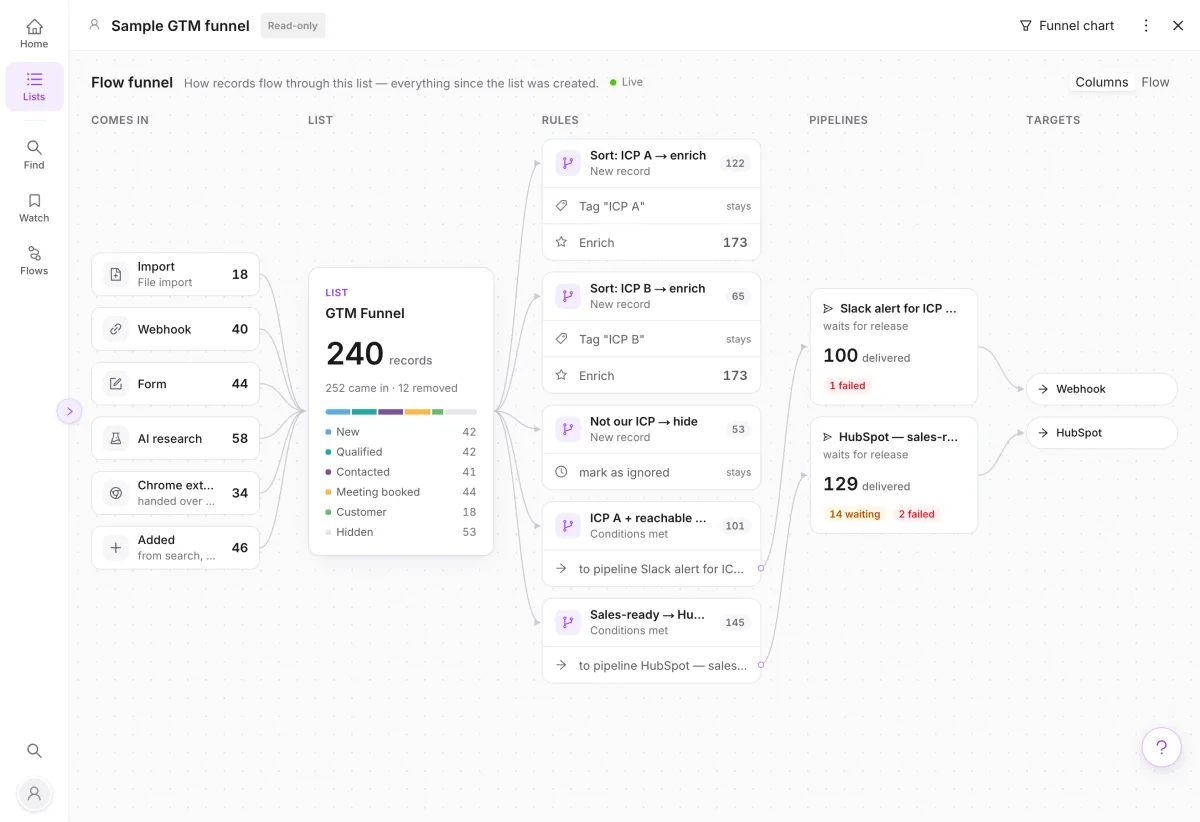
Your process. Your boundaries.
Spending you control
Choose enrichment fields and budgets. Confirm the maximum before a run.
Release on your terms
Start with manual approval. Enable automatic delivery and set its daily limit when you are ready.
EU by default
Hosted in Frankfurt, with EU processing for personal-data AI calls. A DPA is included.
A few things worth knowing.
GTM engineering connects data, decisions and actions into a repeatable process. In ListPlus, that process lives in your list.
Explore GTM engineeringWhat is a GTM engineering list?
A list brings your go-to-market data and its operating logic together. Records enter from files, apps, searches or APIs. Checks and enrichment improve the data, computed columns evaluate it, and rules hand matching contacts to pipelines. You can inspect and edit the records throughout.
Does ListPlus replace my CRM or sequencer?
ListPlus prepares and qualifies the data that those tools use. Your CRM stays the place for deals and sales activity; your sequencer handles campaigns. Pipelines connect your lists to those tools, with checks before delivery.
What updates automatically?
Scores, labels and formulas recalculate when their inputs change. Triggers react to record events. AI text is generated for new rows; changed inputs are marked for regeneration. Connected lists can refresh daily or weekly. A trigger itself is event-based, not scheduled.
Can I use my existing data and tools?
Yes. Import files, connect supported CRM and workspace tools, or send records through forms, webhooks and the Agent API. Columns have content types that help place incoming values. You can inspect the mapping and keep the source of each record.
What happens to contacts that do not pass?
A contact that fails a qualification rule stays in the list. A pipeline entry that is missing a required field is held for review with a reason. Existing customers and blocked contacts can be excluded through reference-list conditions. Your rules define the behavior.
How large can a list be?
A list supports up to 50,000 records, 20 triggers with up to five actions each, 30 sublists and 12 statuses. A score can have up to 20 criteria. Your plan also sets workspace-wide record limits.
Your next process starts with a list.
Bring your data and the question you want it to answer. Build the first step, then connect the rest.