Five ways to get LinkedIn profiles into HubSpot in 2026
HubSpot's own integration, three paid extensions, a webhook into Zapier or n8n, and a free extension. What each needs, what it costs per seat, and how each finds out whether the person is already in your CRM.
When you want to add a LinkedIn profile to HubSpot, you need a way to transfer the details and check whether the contact already exists. LinkedIn has no API that reads other people's profiles and no export for them. The available routes differ in seat costs, where the data passes through and how they check for duplicates.
1. HubSpot's own route: the Sales Navigator integration
HubSpot's knowledge base (read October 21, 2026) lists the requirements: a LinkedIn Sales Navigator Advanced Plus account and an assigned Sales Hub Professional or Enterprise seat per user. You get a Sales Navigator card on contact and company records inside HubSpot, and HubSpot states that the integration cannot import contacts from LinkedIn. It adds to records that exist; for creating contacts from profiles it does nothing. HubSpot Sales for Chrome, the mail extension, does not look a profile up either; see our article on HubSpot's Chrome extension.
2. Paid extensions: HubLead, Surfe, Kaspr
The paid extensions put a panel on the profile: a button that writes the contact to HubSpot and a lookup in the vendor's own database. Prices as of October 21, 2026, from the vendors' pricing pages: HubLead's free Starter shows HubSpot information on a profile but does not create contacts; creating, logging conversations and finding emails start with Professional at $40 per seat and month ($32 billed yearly). Surfe's free plan allows one CRM add a day and 20 emails a month; Essential is $49 per user and month ($39 yearly). Kaspr is first of all a contact-data tool: it reveals emails and phone numbers from its own database, and pushing the contact to HubSpot comes with it. It lists a free plan with 15 email credits a month and HubSpot on every tier; Starter is $49 to $65 per user and month depending on the billing term. If what you need is the phone number, that is the right job for it.
HubLead Professional charges per seat, while lookups use credits on top. The profile's data goes to the vendor's server before it goes to HubSpot. Message logging and email finding may justify that fee for your team; if you only need a CRM check and a way to create a contact, compare the seat cost with lighter options.
3. Zapier, Make or n8n: the trigger has to come from somewhere
The automation layers have good HubSpot nodes. What they lack is a LinkedIn trigger. Zapier's LinkedIn integration (read October 21, 2026) offers two actions, both for posting updates, and no trigger; n8n's LinkedIn node does Post → Create and nothing else. The workflow cannot start from a profile view. It starts from a webhook that something in the browser calls.
The ListPlus extension has such a target built in: under Settings → Hand-over targets → Own endpoint you paste the address, click Send test, and from then on a selection of saved profiles goes there as one JSON POST with name, LinkedIn address, headline, company and location; no ListPlus account needed. Two things break in practice. HubSpot's search step usually keys on email, which a profile does not give you, so search the LinkedIn URL property or the name instead. And a workflow that creates on every POST creates a duplicate on every second visit: build “search first” before “create”.
4. A free extension that answers “in HubSpot?” on the profile
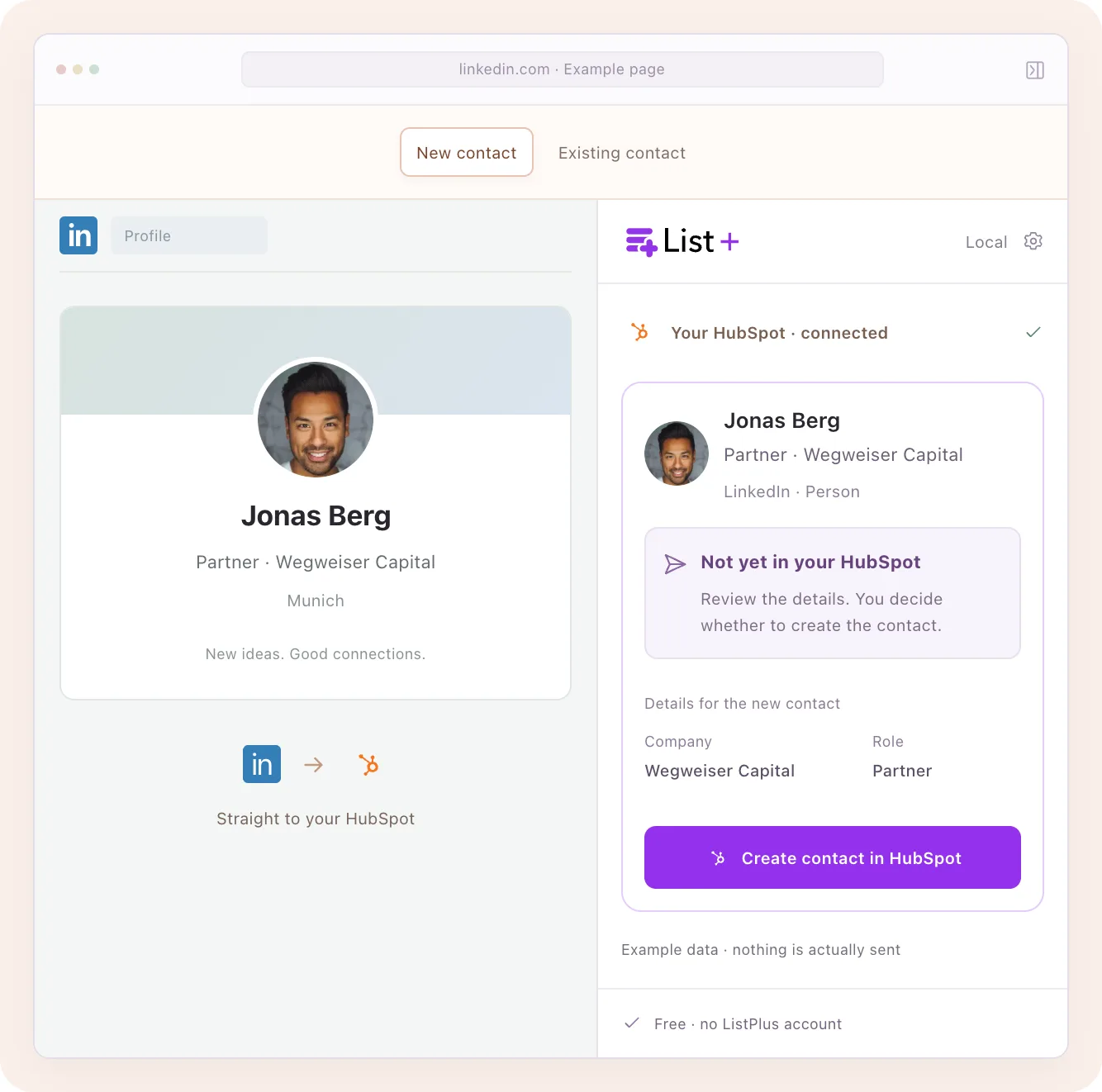
With HubSpot connected in the ListPlus extension (Settings → HubSpot → Connect HubSpot; a HubSpot sign-in, no ListPlus account), a LinkedIn profile shows a line on the card: In HubSpot, Probably in HubSpot, Possible matches in HubSpot, or Not in HubSpot. The lookup goes first to HubSpot's standard LinkedIn URL property, then by first and last name; the company from the headline helps distinguish “probably” from “possible”. Open a suggested record to check the match before linking it.
On Not in HubSpot, Create contact opens a dialog with first name, last name, email, job title, company and the LinkedIn address; exactly what you confirm is written, after one more lookup by address and email. On a match, Link writes the profile's address into that contact's LinkedIn URL property and changes nothing else. The extension talks to HubSpot straight from your browser; HubSpot data does not pass through ListPlus. The app is not yet listed in HubSpot's marketplace, and HubSpot says so at connect. Checking, creating and linking cost nothing.
What it does not do: no message sync, no notes or tasks on the record, no company records yet. For the email a sequence needs, the card offers Enrich when you are logged in to ListPlus (the free Basic plan is enough): 2 credits, about $0.07 on Pro and $0.12 on Basic, charged only when a verified email is found. That click is the one action on the card that sends the profile's address to ListPlus.
5. A list in between, when the CRM should get finished records
When reps should not write into HubSpot from a profile at all, the profiles go into a list first: hand selected entries over to a ListPlus list, let the checks run, enrich with a budget (“at most N credits” for the whole job), and send only the rows that qualify through a pipeline to HubSpot. The HubSpot target is part of Pro and costs 2 credits per delivered record; a failed record costs nothing. The route for volume and for a gate before the CRM; for one profile at a time, a detour.
One rule holds for all five. When the person is already there under a slightly different name, link the LinkedIn address to the existing contact instead of creating a new one. Everyone's next lookup then finds the record by its address, and the duplicate never exists.