Flows: the part of ListPlus that moves leads
Pipelines, targets, the release step, the data check, what a delivered record costs, and the Flow funnel that shows where leads drop.
Qualified leads often move between a list, a CRM, Slack and other tools. Every manual export and import creates another place where a record can wait or fail. Flows shows the hand-off in one place and lets a pipeline deliver records under rules you set.
In ListPlus the thing that moves leads is called Flows. Every list is a flow with five stations: comes in, list, rules, pipelines, targets. You set each station up once; from then on every new lead passes through by itself. This article is about the last two stations and the funnel.
Who it is for
Use a pipeline when contacts should reach an outreach tool only with a verified email, when HubSpot should receive completed fields without overwriting existing ones, or when someone must review a record before it leaves. The release setting determines whether that last check is manual or automatic.
A pipeline in five steps
- Click Flows in the left bar, then the + beside Pipelines in the left column, or New pipeline on the Pipelines page.
- Choose what should happen to each record: HubSpot, Create or update contact; Slack, Post a message to a channel; a webhook URL; an email draft; another list. Pick the account, channel or campaign and the fields to send.
- Set the Data check: conditions as in a list rule, field, operator, value, with AND and OR. A record that does not meet them waits as To review instead of being sent.
- Set Release: Manual (the default) means entries wait under Entries until someone clicks Send or Send all; Automatic sends them right away, optionally with At most … records per day.
- Click Create pipeline and run Test connection with a real record before the first real send.
Records reach a pipeline by hand, from any list or the Watchlist, or from a rule on the list: “when a record is new and meets these conditions, hand it to this pipeline”.
What each target does
The CRMs (HubSpot, Salesforce, Pipedrive, Attio) match each record by email, create new contacts and, for existing ones, do what you chose: only fill empty fields (the default), leave them alone, or overwrite. Every contact written to HubSpot gets a ListPlus ID property, the marker for your own HubSpot workflows; ListPlus never enrols anyone in a sequence. Lemlist and Instantly add the contact as a lead to a campaign. Slack gets one card per record, Google Sheets one row. The webhook sends one signed JSON request per record, with known fields under fixed keys (email, first_name, company_name) whatever your columns are called, so n8n, Make or your own endpoint parse every list the same way.
The email draft target writes a personal email per contact from your template into the Drafts folder of your own Gmail or Outlook. ListPlus sends nothing; you read, edit and send. One draft per address, at most 50 per click.
What a delivery costs
A delivery is priced per record that arrived, not per request, and the price stands on the target's tile. HubSpot, Salesforce and Attio 2 credits ($0.07 on Pro at $0.035 a credit, $0.12 on Basic), Pipedrive 4, Google Sheets 2, Lemlist, Instantly, Slack, Other app and an email draft 1 each, a webhook 0.25. Team email and Another list carry no delivery charge. A record held by the data check, or one the target turned down, costs nothing. Targets that reach a connected tool need Pro (on Basic, one connected tool for 50 credits per 30 days), the webhook works on every plan.
Release: by hand or by itself
Manual release is the review step: entries sit under Entries, a colleague looks, clicks Send, done. Automatic release sends in the name of whoever created the pipeline, within the daily limit if you set one. A pipeline that fails five times in a row pauses itself and says so. Records the data check held as To review are rechecked on every automatic run, so a lead whose email gets enriched on Tuesday goes out on Tuesday, without anyone clicking anything.
The Flow funnel
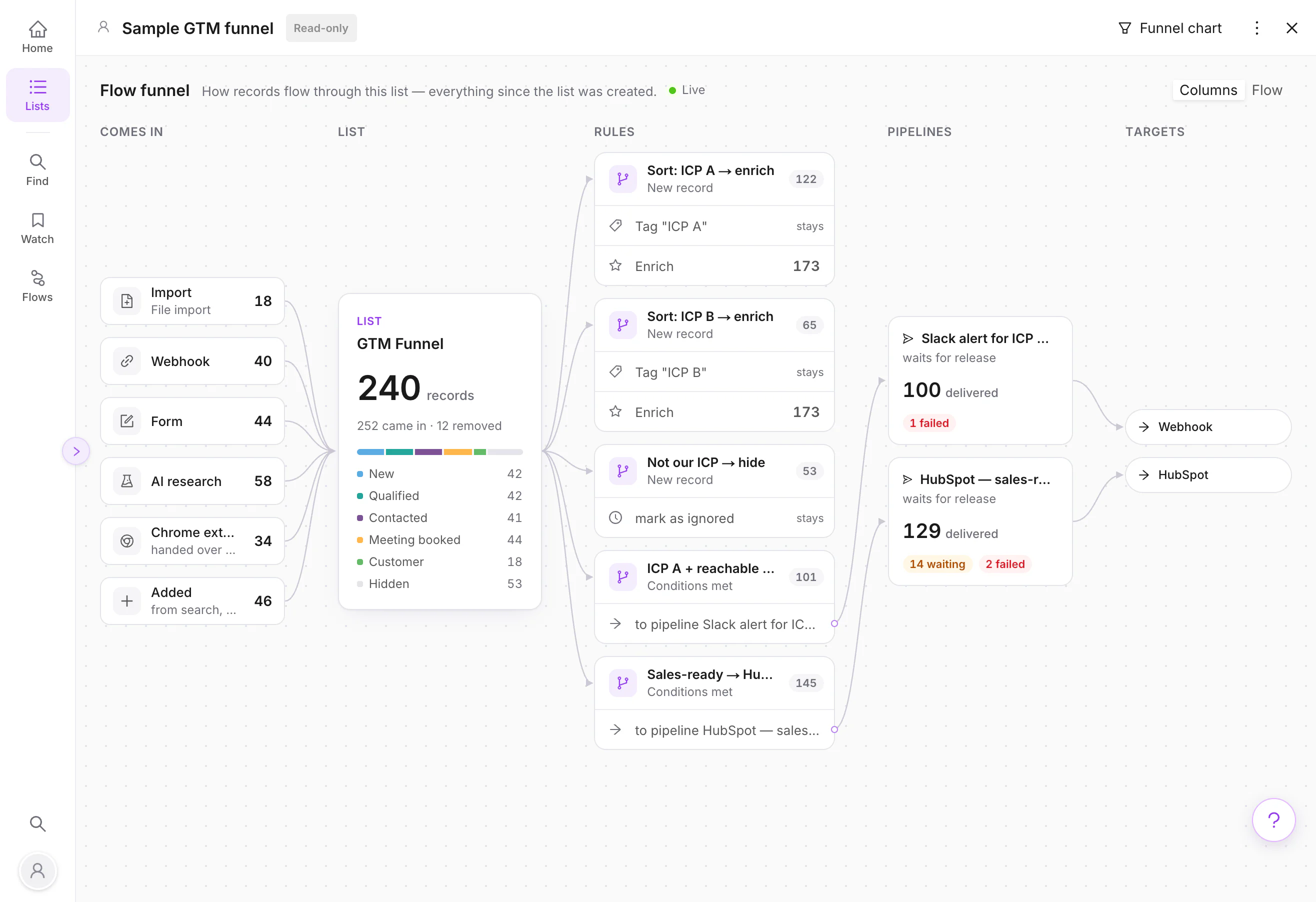
Every list has a second view beside the table: ⋯ at the top right, Flow funnel. It shows the five stations as columns with the numbers since the list was created: how many records came through each way in (import, webhook, form, AI research, the Chrome extension, by hand), each rule with how often it fired, each pipeline with delivered, waiting and failed, and the targets. Click a card and its route lights up.
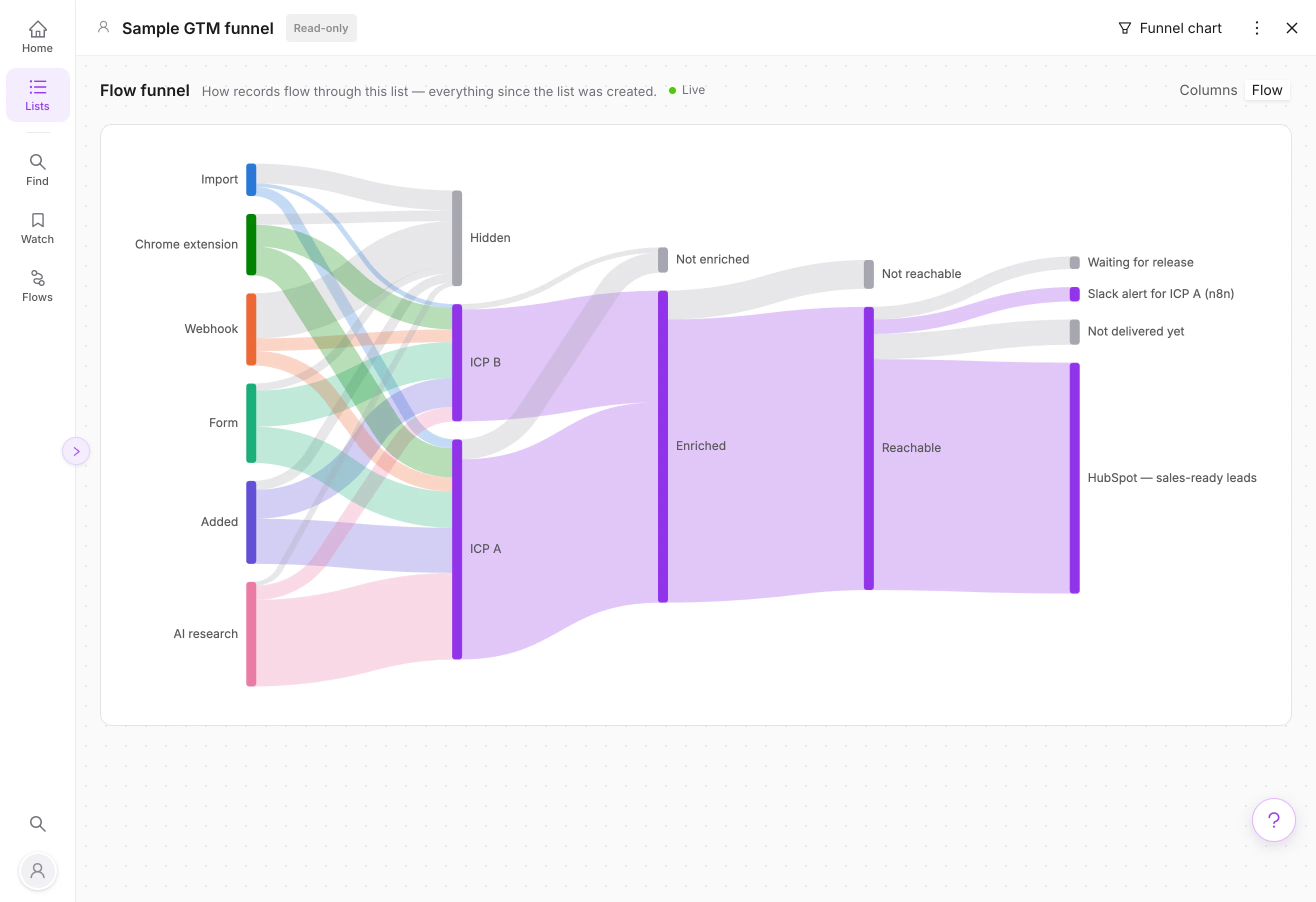
Funnel chart turns the same records into six stages: came in, in the list, enriched, reachable (verified), picked up by a rule, delivered. Each stage counts only records that passed the ones before it. Reachable means the newest check of the email says valid; catch-all and unknown do not count. A stage the list does not use yet is grey and does not filter. The numbers are computed in your browser from the records the list already has; the view costs nothing.
To do: one number
The number on Flows in the left bar is everything that waits for a person: entries of a manual pipeline to release, entries whose send failed or that the data check holds, inbox entries nobody has decided on. One number, one page.
What it does not do
It sends no email to a lead; the draft target stops at your Drafts folder. There is no time-based scheduling, no “send Tuesday at nine”; a pipeline sends when you click or as soon as an entry is ready. Enriching is not a target but a rule's action on the list, with its own budget per record. The limits: 50 pipelines per workspace, 5,000 entries waiting in one pipeline, 1,000 records per add.