ListPlus AI in ListPlus

AI in ListPlus · Built in

Let AI find leads, clean up lists and automate the next step.

Describe what you need in plain words. The research agent, the list assistant and the checks are built into ListPlus — nothing to set up.

No account needed.

Things you stop doing by hand.

Finds your next leads.

The ListPlus research agent.Every match comes with its source.

Find RevOps leaders discussing “Clay alternatives” on LinkedIn.With the comment that makes your opener easy.
Illustrative result
Maya ChenHead of RevOps · Northstar
“We’re looking at alternatives for our enrichment workflow.”
LinkedIn comment · matching signal
More examples (3)
VPs of Sales at companies hiring a Head of RevOps.A hiring signal you can act on today.
Founders of B2B startups that raised a seed round in the last 60 days.Fresh budget, with the source to prove it.
Companies exhibiting at AWS re:Invent.With name and website, ready to enrich.

Cleans up your lists.

Your assistant, right in the list.Tell it what to do in plain words.

Normalize the country names.Shows every change first. You approve.
Illustrative suggestions
Deutschland
Germany
US, USA
United States
More examples (3)
Select rows where the city doesn’t match the country.Finds what a filter can’t.
Select the decision makers.Also finds Geschäftsführer and Directeur.
Find email addresses for the selected contacts.Asks first. Charged only when found.

Automates the next step.

Triggers with AI in the steps.Also on records your agent writes.

WhenA new decision maker has a business emailThenMark “Qualified” and notify SlackFrom new contact to next action.
Illustrative run
  1. Business email found
  2. Status set to Qualified
  3. Sales team notified in Slack
More examples (3)
WhenA contact has no work emailThenFind it, then send it to your CRM
WhenA lead is ready and isn’t already a customerThenSend it to your pipeline
WhenA contact enters an email pipelineThenAI writes the opening. You review the draft.
100+
data checks
11
research sources
13
delivery targets
0
credits when no email or phone is found

Built into ListPlus. You decide what they can change.

Try a sample list

01 / Find new leads

Describe the lead. Get it with the evidence.

Say who you’re looking for. The ListPlus agent researches on its own, even with your window closed. Or hand the same brief to Claude, ChatGPT or your own agent.

  • Start with a specific question

    Choose a role, a market or a signal such as a funding announcement. The agent uses the sources relevant to that task.

  • Keep the evidence with the contact

    Every match shows its source and why it fits. Open the example sources to see what that looks like.

Start an AI research
Your research brief

Find founders of German fintechs that raised their first funding round in the last 90 days.

Fintech founders
CompanyFounderWhy they match
Nordlicht PayBerlin · FintechAva SteinCo-founder & CEOFirst round · 3 weeks ago
View example source: Nordlicht Pay
Company announcement · 3 weeks ago
Berlin-based fintech Nordlicht Pay announces its first funding round. Co-founder and CEO Ava Stein says the investment will support its payments platform.
Forma FinanceHamburg · FintechNoah WolfFounder & CEOFirst round · 5 weeks ago
View example source: Forma Finance
Company announcement · 5 weeks ago
Forma Finance, a fintech based in Hamburg and founded by Noah Wolf, has closed its first external funding round to expand its finance software.
Helio LedgerMunich · FintechElla BrandtCo-founderFirst round · 8 weeks ago
View example source: Helio Ledger
Company announcement · 8 weeks ago
Munich fintech Helio Ledger has secured its first funding round. Co-founder Ella Brandt will lead the rollout of its accounting platform.
Illustrative results and sources · Fictional companies and people
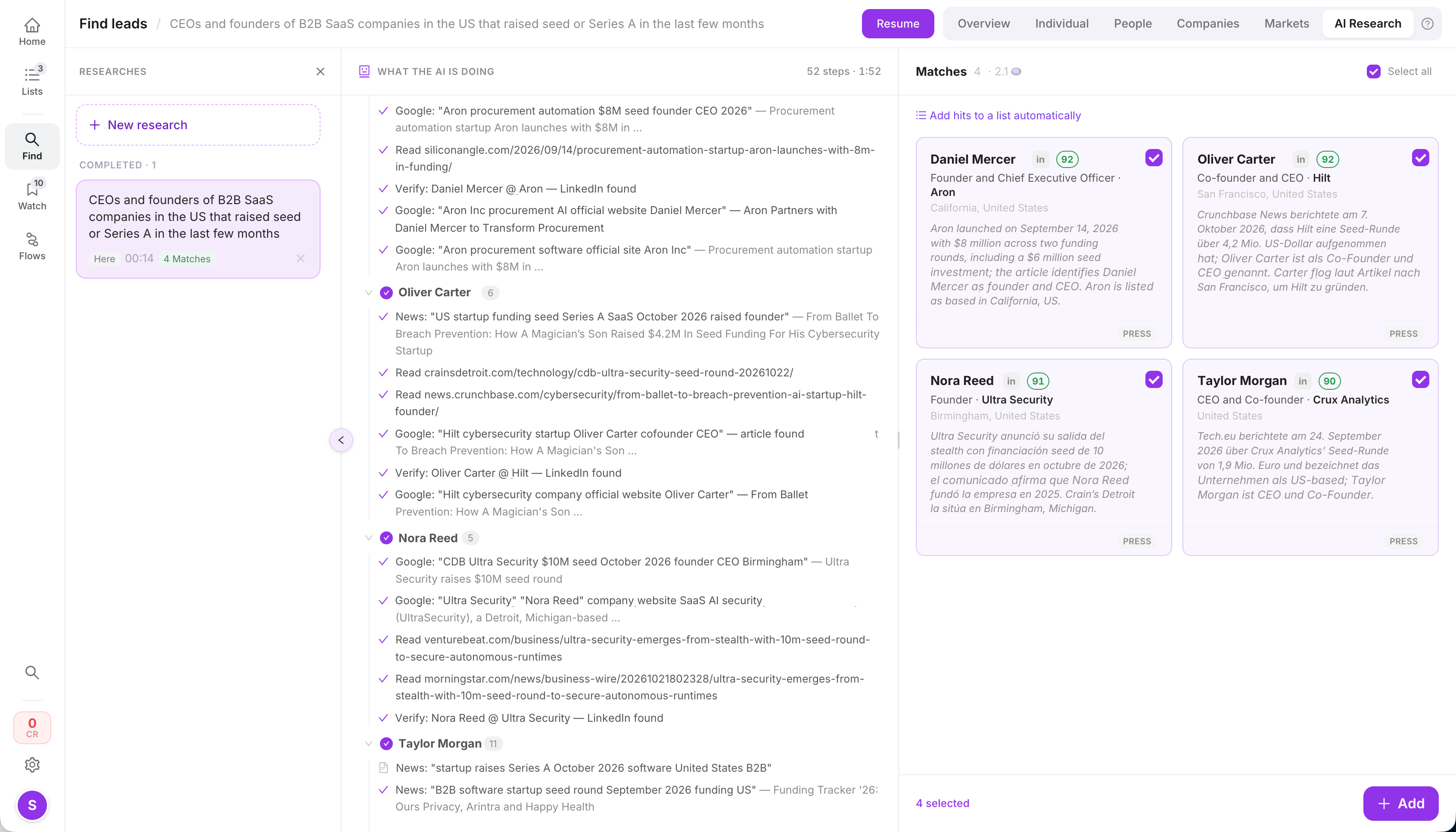
See AI research in the app

Click a number in the image to learn more.Tap a number. Swipe sideways to see more areas.

ListPlus research workspace with a brief, research steps, sources and matching people. Names pseudonymized.
AI research · Names pseudonymizedSwipe to explore

02 / Clean up your lists

100+ checks. Then fix what they find.

The checks show what’s wrong. Tell the assistant in your list what to do, or let your own agent request the fix.

  • Checks find what needs attention

    Missing job titles, duplicates, inconsistent company names: you get specific findings and the contacts behind them.

  • The agent requests the right action

    Correct values, merge duplicates or enrich missing details with the tools you allow.

  • You can see what changed

    Fill only empty fields to keep existing values. Details that cannot be found stay visible for review.

Explore the 100+ checks Open the sample list

Check this list and fill in the missing job titles.

  1. 1
    Check2 job titles are missing
  2. 2
    EnrichLook up those 2 contacts
Your contact list
ContactJob title beforeJob title after
Maya ChenNorthstar LabsMissing
Head of OperationsAdded by enrichment
Leo MartinForma StudioSales Director
Sales DirectorExisting value kept
Sam RiveraArbor CloudMissing
MissingNot found · review
1 detail added. 1 kept. 1 still needs attention.
Example result · Fictional contacts

Look up email addresses. Verify them.

The research briefing explicitly tells your agent never to invent an email address. ListPlus gives it lookup and verification tools to find and check real data.

  1. 1

    Find the address

    Enrichment looks up the person with data providers.

  2. 2

    Check deliverability

    verify_email checks whether a found address is deliverable.

  3. 3

    Keep the result honest

    No reliable result? The instruction is to leave the field empty.

You choose which tools the agent may use. Finding an address and verifying it are separate steps.

03 / Automate the next step

An agent finds the lead. Your list takes it from there.

Set a rule once. Every new or changed record follows it, whether it came from an agent, an import or a webhook.

  • Triggers do the watching

    When a record meets your conditions, they enrich it, set its status or hand it to a pipeline.

  • A data check before anything leaves

    Records with a missing field or on your customer list wait for review. Customer lists are part of Pro.

  • AI writes. You send.

    Email drafts get a personal line for each contact. You read every draft before it goes out.

See how lists work

Illustrative run · New from your agentMaya Chen, Head of RevOps at Northstar

  1. Trigger matchesNew decision maker in the list
  2. Work email foundCharged because it was found
  3. Data check passedNot on your customer list
  4. DeliveredContact in HubSpot, sales team notified in Slack
Hand records on to
  • HubSpot
  • Salesforce
  • Attio
  • Pipedrive
  • lemlist
  • Instantly
  • Slack
  • Google Sheets
  • Email drafts
  • Webhook

04 / Connectors & control

Give AI only the context it needs.

The connector works with your records. The AI gets the values needed for the task. To standardize country names, for example, the model receives the distinct country values. Names, emails and the rest of each record stay out of that request.

In the list assistant: “Standardize country names.”

Sent to AI: country values. No complete records.

Names, emails and phone numbers are not sent. The mapping from values to record IDs (ar_id) stays with the connector.

  1. 1 · The connector groups10,000

    rows in your list

    US
    4,000 rows
    USA
    3,000 rows
    United States
    3,000 rows
    Repeated country values are grouped before the AI request.
  2. 2 · AI interprets3

    distinct values to standardize

    • USUnited States
    • USAUnited States
    • United StatesUnited States
    The model returns a mapping for these values.
  3. 3 · The connector applies7,000

    rows updated after your review

    United States

    3,000 rows were already consistent.

    The connector uses record IDs to update every matching row.
Illustrative example of the list assistant’s normalization flow. The reduction depends on how often values repeat.

Tell the assistant what to do

Find rows, select decision-makers, standardize values or fill a column. The assistant turns your instruction into a command. The connector executes it on the list.

Less data for AI. Less work per list.

The model evaluates the relevant values, not every complete record. Repeated values share one answer. This reduces input tokens and helps keep large lists economical to process. The saving depends on the task, values and model.

Running Claude Code or ChatGPT yourself?

Your own agent can work in your lists too — on the lists and with the rights you share, within a day budget, with the price before it spends.

AI for your agents
A few practical details

Before you start.

Do I need an AI agent of my own?

No. The research agent, the list assistant, the checks and the rules are built into ListPlus. Try them on the sample list without an account. If you already run Claude Code, Claude or ChatGPT, you can connect it as well.

What does the AI see of my data?

Only what the task needs. To standardize country names, the model receives the distinct country values, not your records. AI runs in EU data centers by default, without data retention at the model provider and without training on your data.

What does the built-in AI cost?

The standard checks and their fixes cost no credits. AI research, AI checks and AI columns use credits as listed on the pricing page; email and phone lookups are charged only when found.

Does a found contact automatically count as verified?

No. A found value, an email-verification result and a record meeting your list’s requirements are different things. Run the checks and verify emails before you use the contacts.

Your next step

Let AI do the list work.You keep the rules.

Lead research, cleanup and the steps that follow — built into ListPlus.